
الأجهزة المدعومة
| Device Type | Modbus TCP (Ethernet) | RS485 |
|---|---|---|
| Inepro PRO380 | ❌ | ✅ |
التوصيلات
RS485
RS485 Wiring
- For correct RS485 wiring: Follow the guidelines for RS485 wiring.
- If the wiring shown in the table below is incorrect, please let us know.
- There is no general consensus in the industry about the usage of A and B for the RS485 polarity, so it may be counterintuitive and opposite of what you might expect for some devices.
| Device | DemoBrandName ControllerDemoName model OM1 | DemoBrandName ControllerDemoName model IG8 | RS485-USB converter | RS485-Ethernet converter |
|---|---|---|---|---|
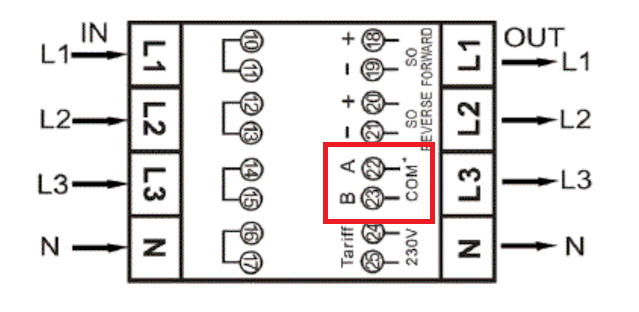
| A (الدبوس 22) | RS485 A | RS485_POS | RS485 A | TX+ |
| B (الدبوس 23) | RS485 B | RS485_NEG | RS485 B | TX- |
| لا ينطبق | RS GND | GND | Not available | G |
الإعداد
NOTE: RS485 Device Addresses
- You MUST give each device on the RS485 bus a unique address. Check the manual of the device on how to do this.
- Use lower addresses first (1, 2, ...) because the DemoBrandName ControllerDemoName will find them faster!
- For each device, it is generally recommended to stick with the factory default baud rate, parity, and stop bits. The DemoBrandName ControllerDemoName will scan on those first.
يرجى الرجوع إلى دليل العداد لمزيد من المعلومات التفصيلية حول تغيير عنوان Modbus. بشكل افتراضي، يتم تعيين العداد على العنوان 1. يمكن تغيير ذلك عبر شاشة العداد.
- استخدم الأزرار للانتقال إلى وضع البرمجة 2.
- اضغط مع الاستمرار على الزر الأيمن لمدة 3 ثوانٍ لفتح القائمة.
- قم بالتمرير إلى صفحة LCD ID Modbus/M-bus (addr xxx).
- اضغط مع الاستمرار على الزر الأيمن لمدة 5 ثوانٍ للدخول إلى وضع البرمجة.
- تبدأ القيمة في الوميض: اختر 3 أرقام (Modbus: 001-247). قم بتأكيد كل رقم بالضغط على كلا الزرين لمدة 3 ثوانٍ.
- تظهر كلمة OK على شاشة LCD عند تأكيد الإعداد.
