
支持的设备
| Device Type | Variants | Modbus TCP (Ethernet) | RS485 |
|---|---|---|---|
| DDSU666 | 230V-5/80A 230V-100A/40mA | ✅ | ✅ |
| DTSU666 | 3x230V/400V-5/80A 3x230V/400V-1.5(6)A 3x230V/400V-100A/40mA | ||
| DTSU666HW | |||
| DTSU666-20 | ❌ |
连接
DemoBrandName与电能表之间的通信通过RS-485串行总线或Modbus TCP进行。
建议使用带有双绞线的屏蔽电缆以获得最佳性能。在短距离内,可以使用网络电缆中的双绞线(最低CAT5e)。
以下指南适用:
- 最大距离:总电缆长度,包括主电缆和分支,限制为100米。
- 连接多个电能表:电缆应从一个表连接到另一个表,或从主电缆分支(分支不得超过1米)。
- 长距离:建议在主电缆的末端安装120Ω终端电阻,并在DemoBrandName ControllerDemoName上激活终端电阻。
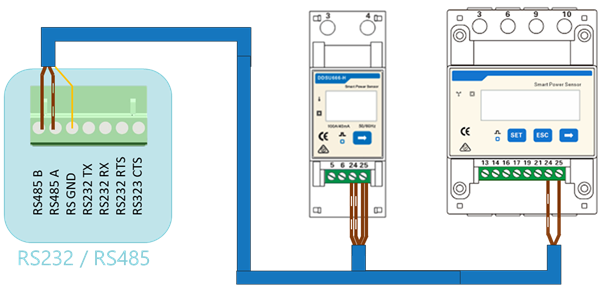
RS485 Wiring
- For correct RS485 wiring: Follow the guidelines for RS485 wiring.
- If the wiring shown in the table below is incorrect, please let us know.
- There is no general consensus in the industry about the usage of A and B for the RS485 polarity, so it may be counterintuitive and opposite of what you might expect for some devices.
| Device | DemoBrandName ControllerDemoName model OM1 | DemoBrandName ControllerDemoName model IG8 | RS485-USB converter | RS485-Ethernet converter |
|---|---|---|---|---|
| Terminal 24 | RS485 A | RS485_POS | RS485 A | TX+ |
| Terminal 25 | RS485 B | RS485_NEG | RS485 B | TX- |
| N/A | RS GND | GND | Not available | G |
NOTE: RS485 Device Addresses
- You MUST give each device on the RS485 bus a unique address. Check the manual of the device on how to do this.
- Use lower addresses first (1, 2, ...) because the DemoBrandName ControllerDemoName will find them faster!
- For each device, it is generally recommended to stick with the factory default baud rate, parity, and stop bits. The DemoBrandName ControllerDemoName will scan on those first.