
KSTAR BlueSpark Series (Gen 2)
A bug in previous versions of the KSTAR integration could cause the battery to incorrectly initiate charging under certain conditions. This issue has been fixed in version 1.23.0.1. Update your controller to resolve this bug.
Because the battery goes into sleep mode at 10% SoC, we recommend setting the minimum state of charge level to at least 12%. When the battery goes into sleep mode, it cannot be controlled by the DemoBrandName ControllerDemoName.
Official KSTAR documentation confirms that Modbus TCP (Ethernet) is not supported for third-party control on these devices. We recommend connecting the KSTAR battery and the ControllerDemoName using RS485.
Supported Devices
| Device Type | Variants | Modbus TCP (Ethernet) | RS485 | Curtailment | Minimum device firmware version |
|---|---|---|---|---|---|
| BlueSpark (2nd Gen) Single-Phase | E(3.68/5/6)KS-D22 | ❌ | ✅ | ✅ | ARM v1.3.00 or higher |
| BlueSpark (2nd Gen) Three-Phase | E(4/5/6/8/10/12)KT-D22 | All versions |
Wiring
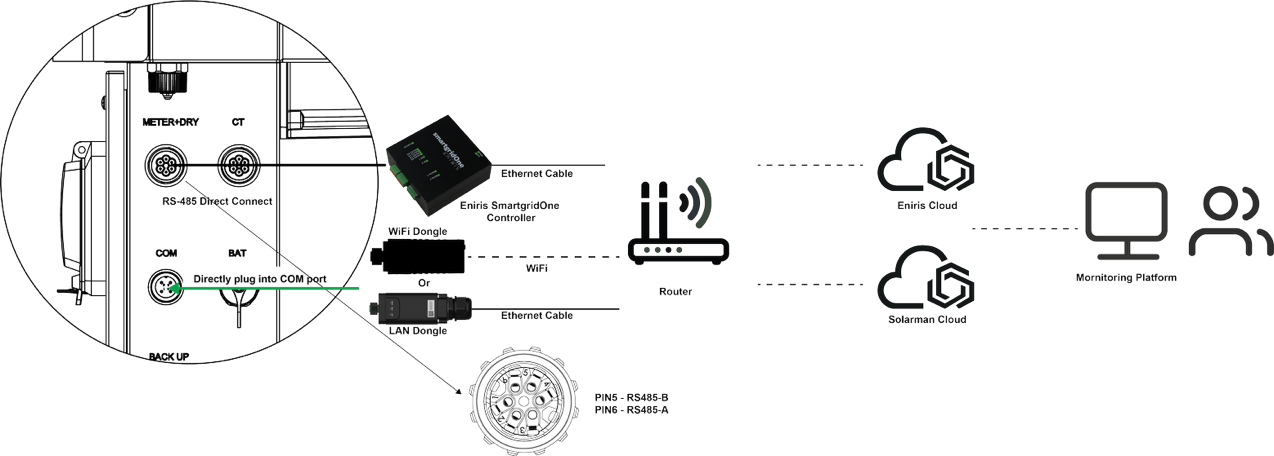
The DemoBrandName ControllerDemoName and the KSTAR inverters communicate via RS485.
Communication Wiring
Both Single-Phase and Three-Phase BlueSpark models share the same pinout. Connect the ControllerDemoName to the CT/METER Port using an RS-485 cable.
- RS485-A: PIN 6
- RS485-B: PIN 5
Configuration
- You MUST give each device on the RS485 bus a unique address. Check the manual of the device on how to do this.
- Use lower addresses first (1, 2, ...) because the DemoBrandName ControllerDemoName will find them faster!
- For each device, it is generally recommended to stick with the factory default baud rate, parity, and stop bits. The DemoBrandName ControllerDemoName will scan on those first.
To ensure the ControllerDemoName can control the inverter, the following settings must be configured on the inverter via the Screen or App.
1. Work Mode Settings
For VPP control to function reliably, you must configure the following:
- Set Work Mode to Self-Consumption.
- Set Charge from Grid to Disable (inside the Self-Consumption menu).
2. Disable Conflicting Modes
The following modes have higher priority than remote control and must be Disabled:
- Force Charge/Discharge (Set to "Invalid" or 0)
- Generator Mode
3. Port Configuration
Ensure the communication port is set correctly:
- CT/Meter Selection: Set to CT (Default).
- Baud Rate: 9600.
Restart the battery inverter after changing the settings.