DEYE

Dispositivos Suportados
| Device Type | Variants | Modbus TCP (Ethernet) | RS485 | Curtailment |
|---|---|---|---|---|
| Inversores Híbridos de Baixa Tensão Monofásicos (SG0XLP1-EU) | SUN-3/3.6/5/6/7/7.6/8/10/12K | ❌ | ✅ | ❌ |
| Inversores Híbridos de Baixa Tensão Trifásicos (SG0XLP3-EU) | SUN-3/4/5/6/8/10/12/14/15/16/18/20K | |||
| Inversores Híbridos de Alta Tensão Trifásicos (SG0XHP3-EU) | SUN-5/6/8/10/12/15/20/25/29.9/30/35/40/50/60/70/75/80K | |||
| Inversores de String Monofásicos (G0XP1-EU) | SUN-1/1.5/2/2.2/2.5/2.7/3/3.3/3.6/4/4.2/4.6/5/5.2/6/6.2/7/7.5/8/9/10/10.5K | |||
| Inversores de String Trifásicos (G0XP3-EU) | SUN-3/4/5/6/7/8/9/10/12/15/18/20/22/23/25/30/35/36/40/45/50/60/70/75/80/90/100/120/125/130/135/136K |
Fiação
RS485
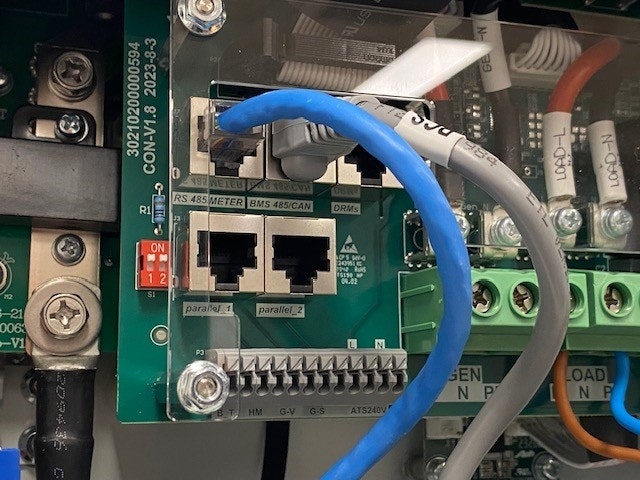
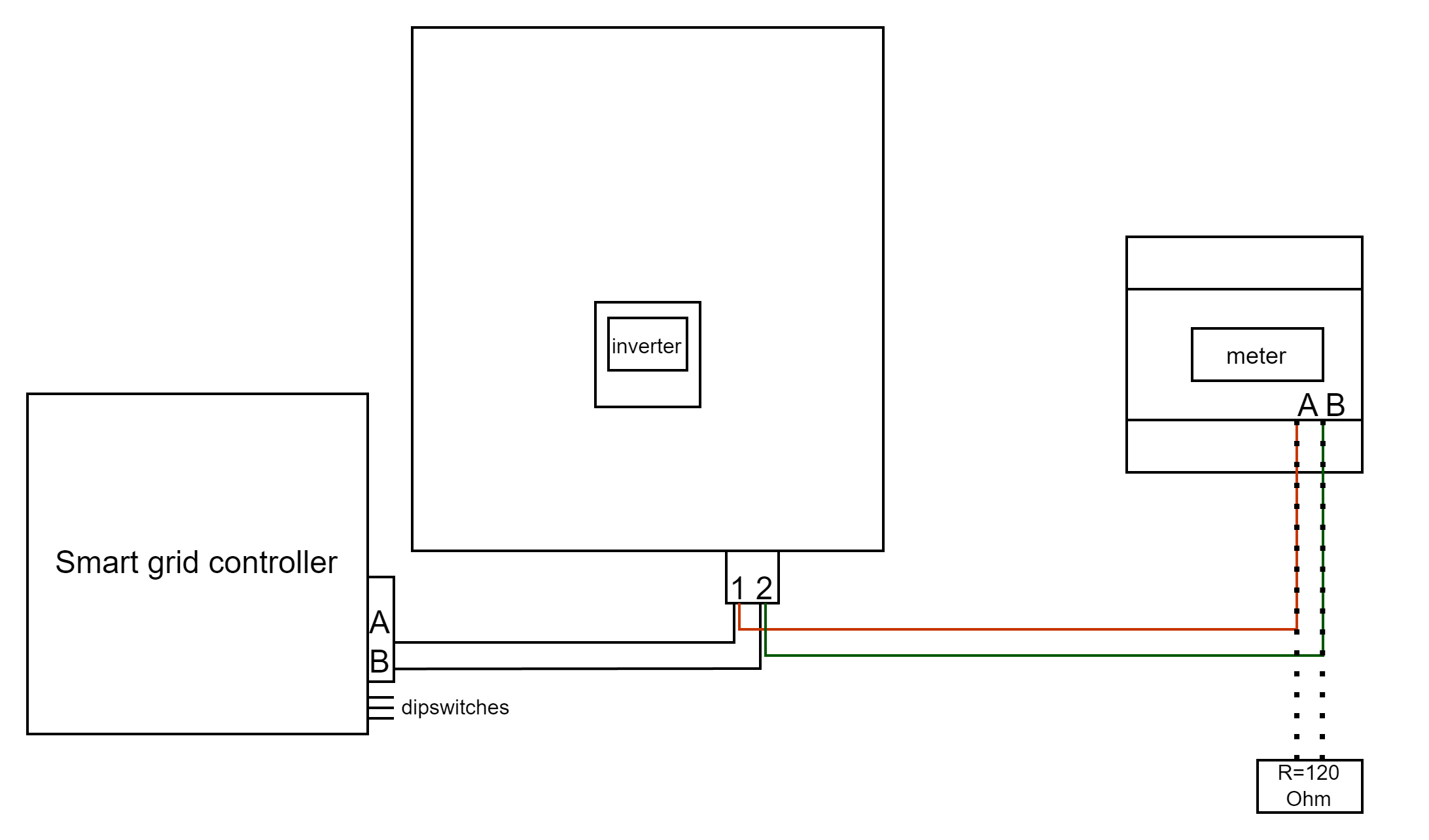
RS485 Wiring
- For correct RS485 wiring: Follow the guidelines for RS485 wiring.
- If the wiring shown in the table below is incorrect, please let us know.
- There is no general consensus in the industry about the usage of A and B for the RS485 polarity, so it may be counterintuitive and opposite of what you might expect for some devices.
| Device | DemoBrandName ControllerDemoName model OM1 | DemoBrandName ControllerDemoName model IG8 | RS485-USB converter | RS485-Ethernet converter |
|---|---|---|---|---|
| Pino 1 / Modbus-485_B | RS485 A | RS485_POS | RS485 A | TX+ |
| Pino 2 / Modbus-485_A | RS485 B | RS485_NEG | RS485 B | TX- |
| Pino 3 / GND_485 | RS GND | GND | Not available | G |
Configuração
NOTE: RS485 Device Addresses
- You MUST give each device on the RS485 bus a unique address. Check the manual of the device on how to do this.
- Use lower addresses first (1, 2, ...) because the DemoBrandName ControllerDemoName will find them faster!
- For each device, it is generally recommended to stick with the factory default baud rate, parity, and stop bits. The DemoBrandName ControllerDemoName will scan on those first.
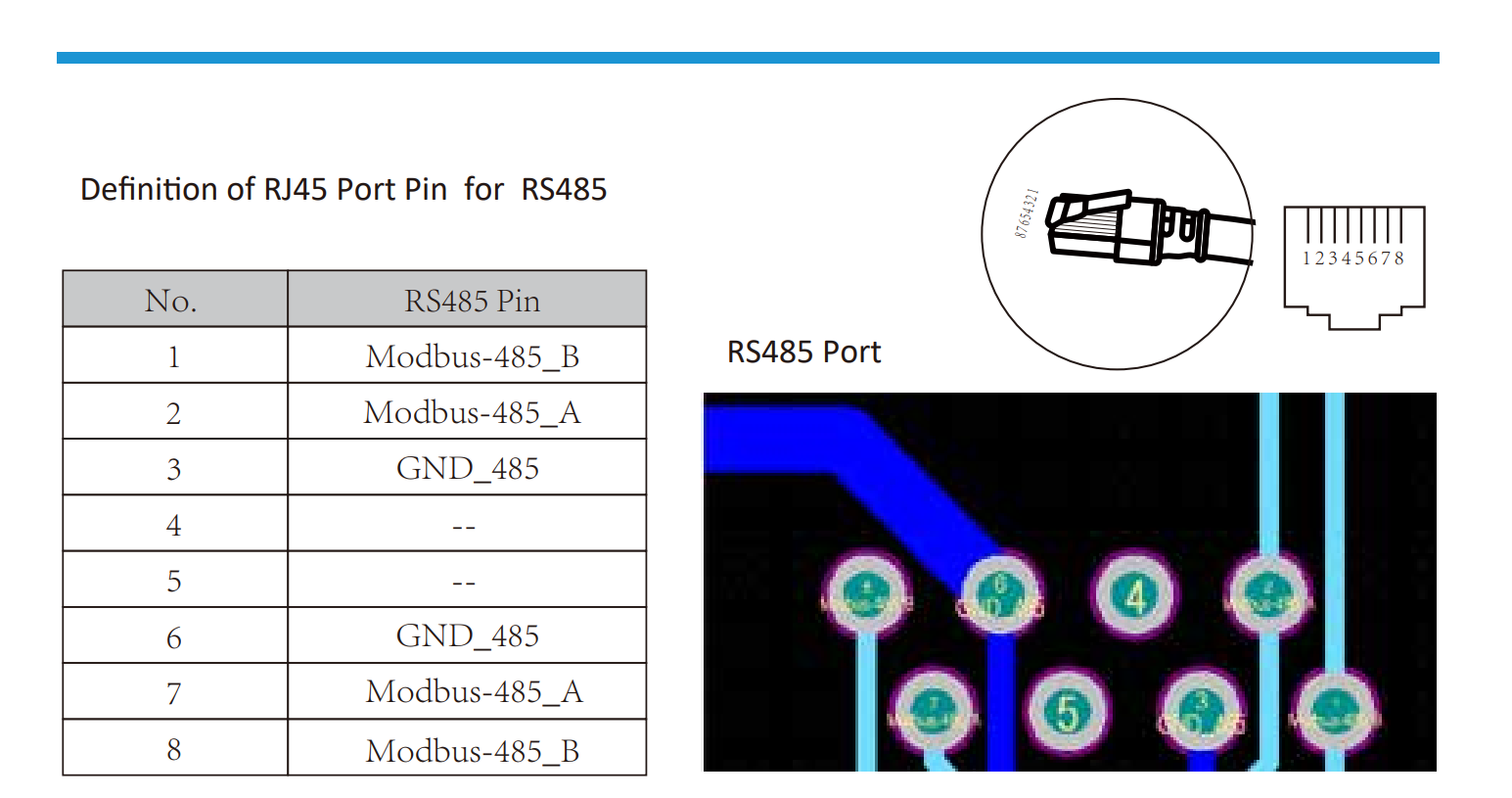
Vá para “Tela Principal” >> “Configurações do Sistema” >> “Função Avançada.”
- O SN do Modbus deve ser configurado para qualquer número entre 1 e 247. Não selecione 0!! Observe que se houver múltiplos dispositivos no barramento RS485, cada um deve receber um número exclusivo. Este é o endereço.
- O escravo deve ser verificado.
- Somente quando um medidor adicional estiver conectado diretamente ao inversor, deve ser verificado “EX_meter For CT”. Se houver apenas um medidor em paralelo com o DemoBrandName ControllerDemoName, ele deve ser desmarcado.
- Certifique-se de que as seguintes configurações estão todas corretas: "Max A Charge", "Max A Discharge", "Grid Charge Ampere"