
TODO: Parece que isso é válido para mais inversores?

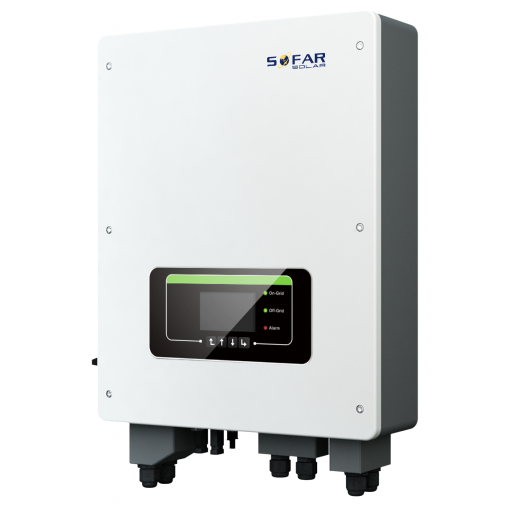
Inversores da Série Sofar TL-G3 e TLM/X-G3
Dispositivos Suportados
| Device Type | Modbus TCP (Ethernet) | RS485 | Curtailment |
|---|---|---|---|
| ... | ✅ | ✅ | ✅ |
Aviso
Aviso
- A maioria dos dispositivos pode se comunicar usando modbus TCP. Isso não é válido para a série "SOFAR 1...40KTL"
- Alguns inversores exigem firmware específico que é limitado a certos distribuidores. Consulte seu distribuidor em caso de dúvida.
Cabeamento
Ethernet
Conecte o inversor à sua rede de internet usando o "SOFAR SOLAR ETHERNET STICK LSE3".
Para o cabeamento correto de ethernet: Siga as orientações para cabeamento de ethernet.
RS485
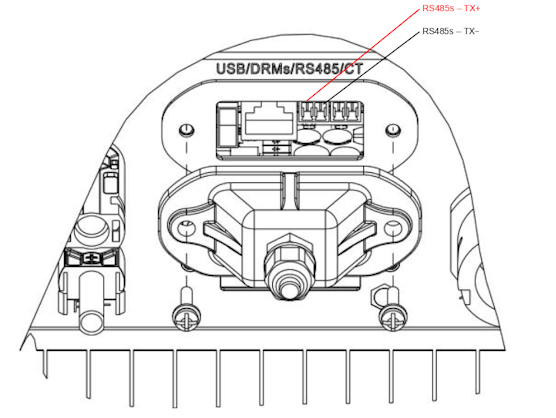
...TL-G3 & G1 & G2
Info
RS485 Wiring
- For correct RS485 wiring: Follow the guidelines for RS485 wiring.
- If the wiring shown in the table below is incorrect, please let us know.
- There is no general consensus in the industry about the usage of A and B for the RS485 polarity, so it may be counterintuitive and opposite of what you might expect for some devices.
| Device | SmartgridOne Controller model OM1 | SmartgridOne Controller model IG8 | RS485-USB converter | RS485-Ethernet converter |
|---|---|---|---|---|
| RS485s TR+ | RS485 A | RS485_POS | RS485 A | TX+ |
| RS485s TR- | RS485 B | RS485_NEG | RS485 B | TX- |
| N/A | RS GND | GND | Not available | G |
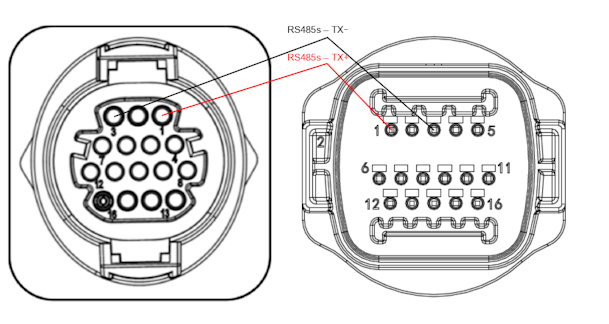
...TLX & TLM
Info
RS485 Wiring
- For correct RS485 wiring: Follow the guidelines for RS485 wiring.
- If the wiring shown in the table below is incorrect, please let us know.
- There is no general consensus in the industry about the usage of A and B for the RS485 polarity, so it may be counterintuitive and opposite of what you might expect for some devices.
| Device | SmartgridOne Controller model OM1 | SmartgridOne Controller model IG8 | RS485-USB converter | RS485-Ethernet converter |
|---|---|---|---|---|
| RS485s TR+ (pin 1) | RS485 A | RS485_POS | RS485 A | TX+ |
| RS485s TR- (pin 3) | RS485 B | RS485_NEG | RS485 B | TX- |
| N/A | RS GND | GND | Not available | G |
Configuração
RS485
Aviso
NOTE: RS485 Device Addresses
- You MUST give each device on the RS485 bus a unique address. Check the manual of the device on how to do this.
- Use lower addresses first (1, 2, ...) because the SmartgridOne Controller will find them faster!
- For each device, it is generally recommended to stick with the factory default baud rate, parity, and stop bits. The SmartgridOne Controller will scan on those first.
O controle externo do inversor deve ser ativado no menu de configuração do inversor via a tela LCD.
- Clique brevemente no botão para baixo.
- Você verá "1. Enter settings", pressione o botão para baixo por 2 segundos para entrar nas configurações.
- Navegue pelas configurações até ver:
- Modbus Address ou
- Set ComProtocol
- Pressione o botão para baixo por 2 segundos para definir o endereço.
- Defina o Endereço para o valor desejado.