Medidores de Energia da Série PM 5000 da Schneider-Electric

Dispositivos Suportados
A série PM 5000 cobre uma ampla gama de medidores. As capacidades variam conforme o número do modelo específico (por exemplo, PM51xx geralmente são apenas RS485, enquanto PM5320/PM5340 incluem Ethernet).
| Device Type | Modbus TCP (Ethernet) | RS485 |
|---|---|---|
| Schneider-Electric PM 5100 / 5110 / 5111 | ❌ | ✅ |
| Schneider-Electric PM 5310 / 5330 / 5331 | ||
| Schneider-Electric PM 5320 / 5340 / 5341 | ✅ |
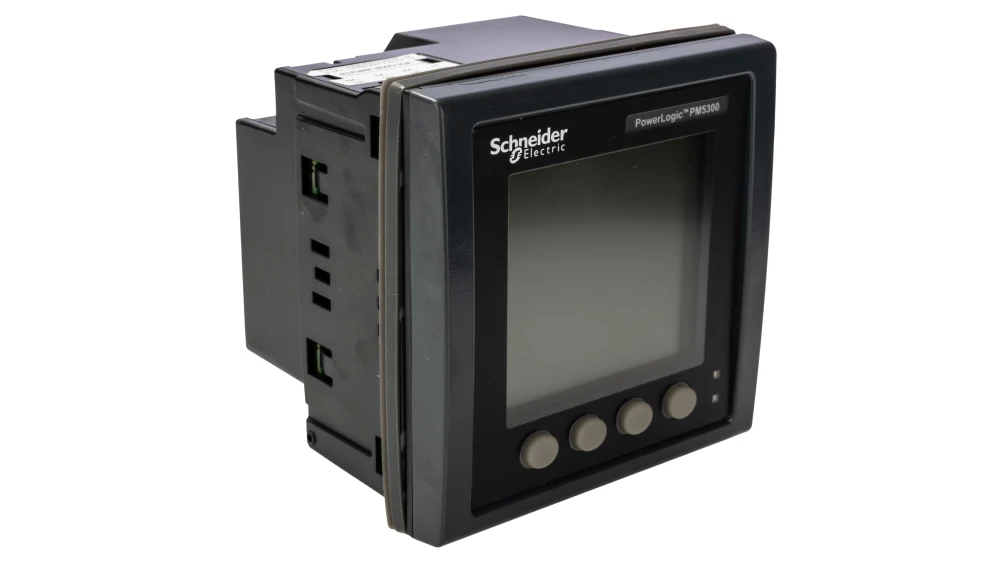
pm5300
Fiação
Ethernet
Aplicável somente ao PM5320, PM5340 e PM5341. Para a fiação correta do ethernet: siga as diretrizes para fiação de ethernet.
RS485
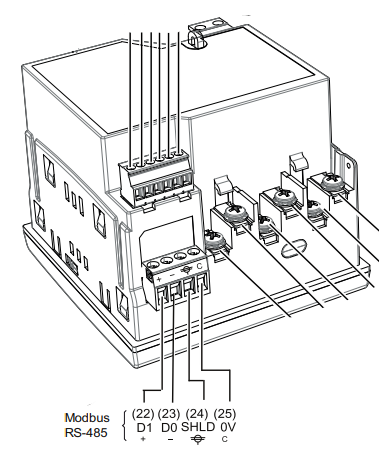
Os terminais RS485 estão localizados na parte inferior do dispositivo (conector 6 no diagrama abaixo).
RS485 Wiring
- For correct RS485 wiring: Follow the guidelines for RS485 wiring.
- If the wiring shown in the table below is incorrect, please let us know.
- There is no general consensus in the industry about the usage of A and B for the RS485 polarity, so it may be counterintuitive and opposite of what you might expect for some devices.
| Device | SmartgridOne Controller model OM1 | SmartgridOne Controller model IG8 | RS485-USB converter | RS485-Ethernet converter |
|---|---|---|---|---|
| Terminal 22 / D1 (+) | RS485 A | RS485_POS | RS485 A | TX+ |
| Terminal 23 / D0 (-) | RS485 B | RS485_NEG | RS485 B | TX- |
| Terminal 25 / 0V | RS GND | GND | Not available | G |
Nota
Blindagem: O fio de blindagem deve ser conectado ao Terminal 24 (SHLD). Observe que o terminal terra não está disponível no medidor em si; a blindagem deve ser conectada ao terra na outra extremidade do barramento[cite: 246, 1627].
Configuração
Ethernet
Aplicável somente ao PM5320, PM5340 e PM5341. Para configurar o endereço IP:
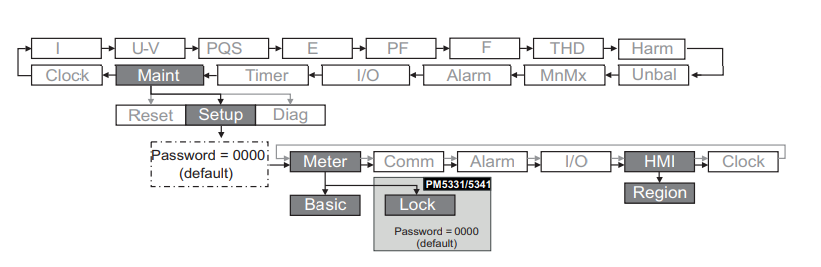
- Navegue até Maint > Setup > Comm > Enet.
- Configure o Endereço IP, Máscara de Sub-rede e Gateway.
- Certifique-se de que o protocolo Modbus TCP está habilitado (normalmente a Porta 502).
RS485
NOTE: RS485 Device Addresses
- You MUST give each device on the RS485 bus a unique address. Check the manual of the device on how to do this.
- Use lower addresses first (1, 2, ...) because the SmartgridOne Controller will find them faster!
- For each device, it is generally recommended to stick with the factory default baud rate, parity, and stop bits. The SmartgridOne Controller will scan on those first.
Para configurar as configurações seriais (baud rate, paridade, ID):
- Navegue até Maint > Setup > Comm > Ser.
- Edite o Endereço (ID da unidade), taxa de Baud e Paridade para corresponder às configurações do seu gateway.